
Good lumbar support for office chair users is the simplest fix for a stiff lower back after a long workday. Most office chairs leave a gap behind the small of your back, so after a few hours you slouch, your shoulders roll forward and your back starts to ache. This guide explains why that happens, how to tell whether your chair is letting you down, the different kinds of lumbar support you can buy, and exactly how to set up your desk so you sit comfortably all day.
It is written for anyone who spends long hours sitting: remote workers at a kitchen table, office staff in a corporate chair, students, gamers and people who run their business from a laptop. You do not need to buy a new chair to sit better. In most cases, a few adjustments and the right support make the difference.
Why Sitting All Day Strains Your Lower Back
Your spine is not straight. Seen from the side it has three gentle curves: one in your neck, one in your upper back and an inward curve in your lower back called the lumbar curve. When you stand, your muscles and ligaments hold those curves without much effort. Sitting changes that.
When you sit in a chair with a flat or hollow backrest, your pelvis tends to tip backward. As it tips, the lumbar curve flattens and can even reverse into a C shape. Your head drifts forward to see the screen, your shoulders round, and the muscles of your lower back have to work constantly to stop you from collapsing further. Hold that position for hours and those muscles get tired. That fatigue is the dull ache many people feel by mid-afternoon.
The Mayo Clinic office ergonomics guide recommends choosing a chair that supports the curve of your lower back, or adding a cushion or rolled towel when your chair does not. In other words, the experts agree that lumbar support for office chair setups matters, whether it is built into the chair or added separately.

7 Signs Your Chair Is Missing Lumbar Support
Not every chair needs extra support. Here are the signs that yours does:
- You can slide your hand easily into the gap between your lower back and the backrest.
- You find yourself perching on the front edge of the seat instead of sitting back.
- Your lower back feels stiff or tired after an hour or two, then better when you stand.
- You keep shifting position, crossing your legs or tucking a foot under you.
- Your head and shoulders drift toward the screen as the day goes on.
- You have started using a sweater or a cushion behind your back without thinking about it.
- The chair is a dining chair, a sofa or a gaming chair with a flat back.
If two or more of these sound familiar, adding lumbar support for office chair use is likely to make sitting more comfortable.
How Lumbar Support for Office Chair Comfort Works
A lumbar support fills the space between the small of your back and the backrest. With that space filled, your back has something to lean into, and the natural inward curve is supported instead of flattened. Sitting upright then takes less muscle effort, because the chair is doing part of the work.
- Fills the gap: the support sits in the curve of your lower back so it does not sag.
- Keeps you upright: leaning back into support is easier than holding a posture with your muscles.
- Encourages you to sit back: with something to lean on, you are less likely to perch on the edge of the seat.
- Works with any chair: you do not need an expensive ergonomic chair to get lower back support.
Types of Lumbar Support Compared
There are several ways to add lumbar support for office chair comfort. Each has strengths and trade-offs.
Built-in adjustable lumbar support
Many ergonomic chairs have a lumbar pad you can move up, down, in or out. When set correctly it works very well. The downsides are cost, since these chairs often cost several hundred dollars, and the fact that the support stays with that one chair.
Strap-on mesh back supports
These are curved mesh panels that strap to the backrest. They are cheap and breathable but often too firm or too large for smaller people, and they can slide out of position during the day.
D-shaped and contoured foam cushions
Larger cushions that cover most of your back. They give a lot of support but take up space on the seat, which can push you forward and shorten the usable seat depth.
Lumbar rolls
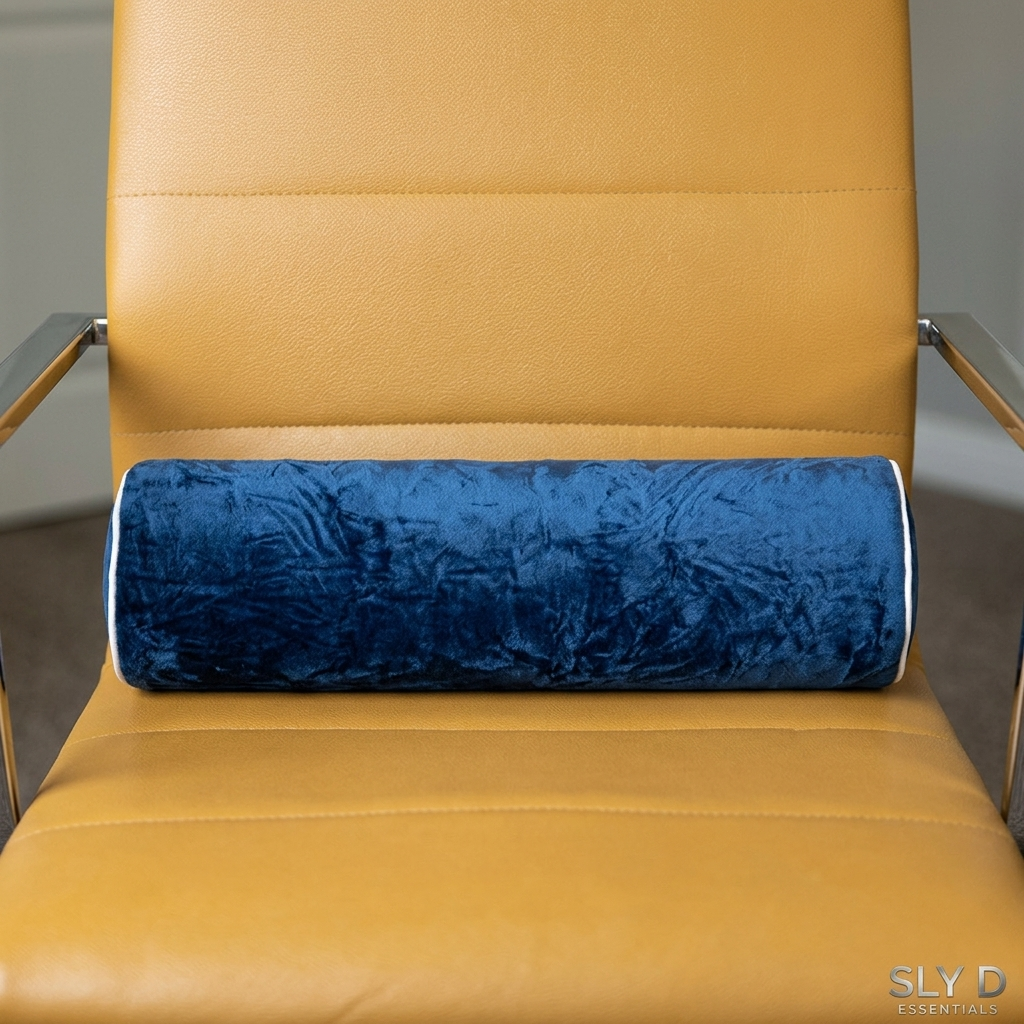
A cylinder of foam that sits just in the small of your back. Rolls are compact, easy to position and portable, which is why they are the classic recommendation for lumbar support for office chair use. A memory foam roll, like the Sly D Essentials memory foam lumbar pillow, adds the comfort of foam that shapes itself to you.
A rolled towel
The free option. A tightly rolled bath towel works in a pinch, but it unrolls, compresses quickly and does not look great in an office. It is a good way to test whether lumbar support helps you before buying something better.
How to Choose Lumbar Support for Office Chair Use
- Shape: a roll targets the lower back precisely; a large cushion supports more of the back but takes more seat space.
- Firmness: look for medium-firm. Too soft and it flattens; too hard and it presses into your spine.
- Size: it should fit across the width of your chair without hanging off the sides. Around 17 to 18 inches long suits most chairs.
- Material: memory foam molds to your back and recovers its shape; cheap polyurethane foam often flattens within weeks.
- Cover: choose a soft fabric that looks right in your workspace and does not feel scratchy through a shirt.
- Portability: if you also drive or fly a lot, pick something small enough to carry, ideally with a bag.
5 Steps to Set Up Lumbar Support for Office Chair Use
- Sit all the way back in your chair so your hips touch the backrest.
- Place the lumbar pillow at belt height, in the small of your back. You should feel it filling the curve, not pushing your shoulders forward.
- Adjust the seat height so your feet rest flat on the floor and your knees are about level with your hips.
- Bring the top of the screen to about eye level so you are not leaning forward to read.
- Stand up and move for a few minutes every hour, even with good support.
The Full Desk Ergonomics Checklist
Lumbar support for office chair comfort is one piece of a comfortable workstation. Once your lower back is supported, check the rest of your setup:
- Feet: flat on the floor or on a footrest. Dangling feet pull you forward in the seat.
- Knees: about level with your hips, with a gap of two or three fingers between the seat edge and the back of your knees.
- Elbows: close to your body and bent at roughly 90 degrees when typing.
- Keyboard and mouse: close enough that you do not reach forward.
- Screen: about an arm’s length away, top edge near eye level.
- Laptop: raise it on a stand and use a separate keyboard so you are not looking down all day.
- Lighting: avoid glare on the screen, which makes you lean in.
Movement Matters as Much as Support
Even perfect lumbar support for office chair users is not a reason to sit still for eight hours. Your body likes variety. Try these habits:
- Stand up every 30 to 60 minutes, even for a minute or two.
- Take phone calls standing or walking.
- Refill your water glass often; it gets you up and keeps you hydrated.
- Alternate between sitting and standing if you have a sit-stand desk.
- Take a short walk at lunch instead of eating at your desk.
If you want to add gentle stretches, keep them easy and stop if anything hurts. If you have ongoing pain or a back condition, ask a doctor or physical therapist which movements are right for you.
Working From Home: Kitchen Chairs, Sofas and Beds
Home setups are often the worst offenders, and they need lumbar support for office chair substitutes most of all. Dining chairs are upright but flat, sofas are soft and deep, and working from bed rounds your whole spine. A portable lumbar roll helps in each case. On a dining chair it adds the missing curve. On a sofa it gives you something to sit against so you do not sink. In bed, placing it under your knees while you read takes some pressure off your lower back. If you work from home most days, investing in a proper desk and chair is worth it, but a lumbar pillow is the quickest, cheapest improvement.
Built-In Lumbar Support or a Separate Pillow?
Some ergonomic chairs have adjustable lumbar support built in. They work well, but they often cost several hundred dollars, and the support is fixed to that one chair. A separate lumbar pillow costs far less and moves with you from your desk chair to your car seat or a plane seat. If your current chair is comfortable apart from the lower back, a pillow is usually the smarter first step. If you later buy an ergonomic chair, the pillow becomes your travel and car support.
Why Memory Foam Makes Better Lumbar Support
Cheap foam cushions are either too soft, so they flatten, or too hard, so they push into your back. Memory foam sits in between. It softens slightly with body heat, shapes itself to the curve of your back and returns to its shape when you stand up. That combination of support and comfort is why memory foam is the most popular material for lumbar support for office chair users.
The Sly D Essentials memory foam lumbar pillow uses a memory foam core in a compact roll, about 17.7 x 4.3 inches (45 x 11 cm), with a soft navy velvet-touch cover and a black drawstring bag for carrying it between home, office and car.
Lumbar Support for Different Chairs
Every chair needs support in a slightly different way. Here is how to get lumbar support for office chair types you are most likely to sit in.
Mesh office chairs
Mesh backs flex as you lean, which feels comfortable at first, but many sag in the middle over time and leave the lower back hanging. A foam roll gives the mesh a firm point of contact exactly where you need it. Check that the roll does not slip down the mesh; if it does, sit back firmly against it so your weight holds it in place.
Leather executive chairs
Big padded executive chairs look supportive, but the padding is often thickest at the shoulders and thin at the lower back. Because the seat is deep, many people slide forward. A lumbar roll fills the hollow and lets you sit all the way back.
Gaming chairs
Gaming chairs usually come with a loose lumbar cushion on a strap. These are often too big and too soft, and they sit too high. If yours pushes your shoulders forward, swap it for a smaller, firmer roll placed at belt height.
Dining and kitchen chairs
Wooden and plastic chairs are upright, which is good, but the backrest is flat. A roll adds the missing curve and makes a dining chair workable for a few hours of laptop work.
Lumbar Support for Different Body Types
- Taller people: the curve of your lower back sits higher on the backrest. Move the pillow up until it fits the curve rather than your belt line.
- Shorter people: your knees may hit the seat edge before your back reaches the backrest. A lumbar roll effectively shortens the seat depth so you can sit back properly. Add a footrest if your feet do not reach the floor.
- Larger frames: a roll of about 17 to 18 inches spans the back without digging in at the sides.
- Pregnancy: extra lower back support is popular, but check with your doctor or midwife about what is comfortable for you.
How Soon Will You Notice a Difference?
Most people who add lumbar support for office chair use notice right away that sitting back feels easier, because the gap behind the lower back is filled. Getting used to sitting upright can take a few days, especially if you are used to slouching. It may feel unusual at first; that is normal. Give it a week of regular use before deciding whether it works for you, and adjust the height a little each day until it feels natural. If you feel any sharp or increasing pain, stop and speak to a health professional.
Caring for Your Lumbar Pillow
- Keep it out of direct sunlight for long periods, which can dry out foam over time.
- Spot-clean the cover with a damp cloth and mild soap, then let it air dry.
- Let it breathe overnight rather than leaving it squashed in a bag.
- Store it in its drawstring bag when you travel to keep it clean.
- Avoid soaking the foam core; memory foam takes a long time to dry.
Common Mistakes to Avoid
- Placing it too high: a pillow between your shoulder blades pushes you forward. Keep it at belt height.
- Using a pillow that is too thick: you should feel supported, not arched backward.
- Perching forward anyway: support only helps if you sit back against it.
- Ignoring the rest of the desk: a low screen will still pull you forward.
- Never getting up: no cushion replaces regular movement.
Frequently Asked Questions
Does lumbar support for office chair use help with lower back discomfort?
Many people find sitting more comfortable with lumbar support because it reduces slouching. It is not a medical treatment. If you have ongoing back pain, talk to a doctor or physical therapist.
Where exactly should a lumbar pillow go?
In the small of your back, roughly level with your belt or the top of your hip bones.
How long should I use it each day?
Use it whenever you sit for long periods. If it feels unfamiliar at first, start with an hour or two and build up over a few days.
Is a firm or soft lumbar pillow better?
Medium-firm suits most people. It should hold its shape under your weight while still feeling comfortable.
Can I use the same pillow in my car?
Yes. The same roll works on car seats and plane seats. See our guide to the best lumbar pillow for travel.
Do I still need lumbar support with an ergonomic chair?
If your chair has adjustable lumbar support and it fits you, probably not at your desk. Many people still use a pillow for the car and for travel.
The Bottom Line
You do not need to replace your chair to sit more comfortably. Fill the gap behind your lower back, set your desk at the right heights and get up regularly. Those three changes are the core of good lumbar support for office chair users, and they cost far less than a new chair.
Ready to give your chair the support it is missing? Every order ships free in the US and comes with a 30-day money-back guarantee.